Instructions
Step-by-step guides on how to earn, claim, and play smarter

Complete Stake Casino Guide
Learn how to deposit, use the Buy Crypto feature, and withdraw from Stake. This comprehensive guide covers everything from setting up your account to cashing out your winnings.
Accessing Stake
How to access Stake and claim your exclusive bonuses with code SZYMOOL.
Go to the Stake website:
Alternative Access Methods
If link is blocked, follow our guide on bypassing internet restrictions or use a VPN to access the site.
Exclusive SZYMOOL Bonuses
All players using code SZYMOOL will receive:
- 200% Deposit Bonus - Triple your first deposit!
- Monthly Wager Race - Compete for prizes every month ($100,000 pool) and every week ($10,000 pool)
- Giveaway - Special bonuses on the site just for our community
- Tournaments - Unique tournaments with prizes during streams
200% Deposit Bonus Terms
You MUST message support after making a deposit to claim your bonus!
Not sure if you registered with code SZYMOOL?
Go to your profile on this site, enter your Stake nickname and you'll receive information whether you're from Szymool's referral and eligible for rewards!
Can't access the site?
- Change your DNS settings to 1.1.1.1 or 8.8.8.8
- Use a VPN for Stake. It is fully compliant with their terms and conditions.
- Check our complete guide on bypassing restrictions
Seeing a licensing restriction message?
Due to licensing restrictions, access to Stake from your current IP address is not possible.
If you see this message on Stake when logging in or registering, it means you're connecting from a country where Stake doesn't have a license.
How to fix this? You need to use a VPN and set the country to Canada or Cyprus - then restart your browser and you should be able to log in/register. After logging in, you can disconnect from the VPN.
Stake does not prohibit the use of VPN.
Using Buy Crypto Feature with BLIK
The easiest way to fund your Stake account directly using BLIK payments through the integrated Swapped service.
Step-by-Step Buy Crypto Process
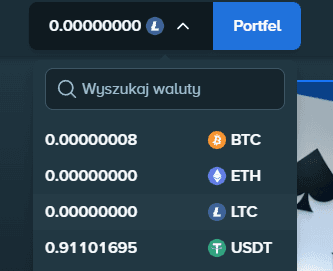
Step 1: Select the cryptocurrency you're interested in
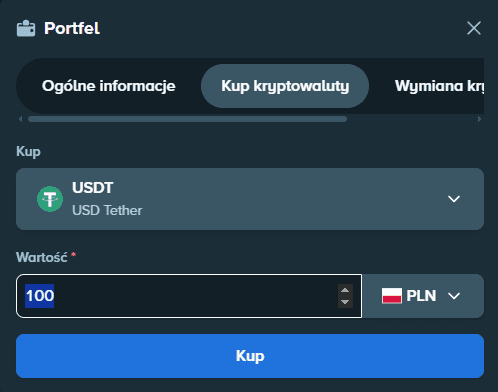
Step 2: Enter the amount in PLN
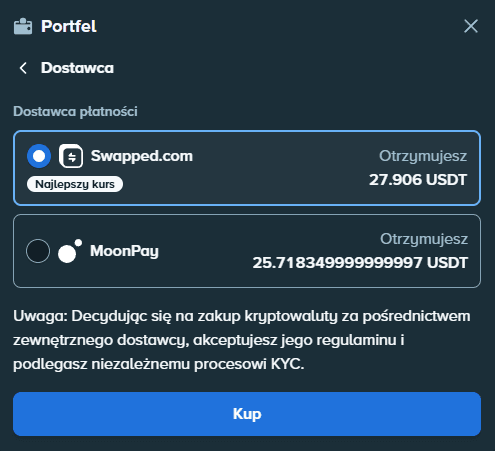
Step 3: Choose a provider, e.g. Swapped
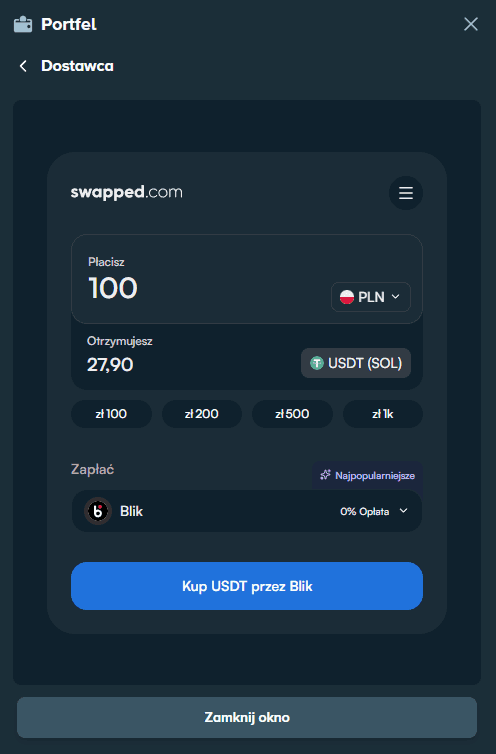
Step 4: Choose BLIK as payment method (other options are also available, e.g. card, PaySafeCard, etc.)
- Navigate to the Wallet section in your Stake account
- Click on "Buy Cryptocurrencies" option
- USDT or LTC, for the lowest transaction fees
- Enter the amount you want to purchase in PLN
- Swapped as your payment processor
- BLIK as your payment method
- Follow the Swapped instructions:
- Enter your email address
- Verify your phone number (you'll receive an SMS code)
- Enter your 6-digit BLIK code from your banking app
- Confirm the transaction
- If you don't have a Swapped account yet, the service may require identity verification
- Wait 5-15 minutes for the crypto to appear in your Stake balance
Depositing Cryptocurrency
If you already own cryptocurrency, you can deposit it directly to your Stake wallet.
Direct Crypto Deposit Process
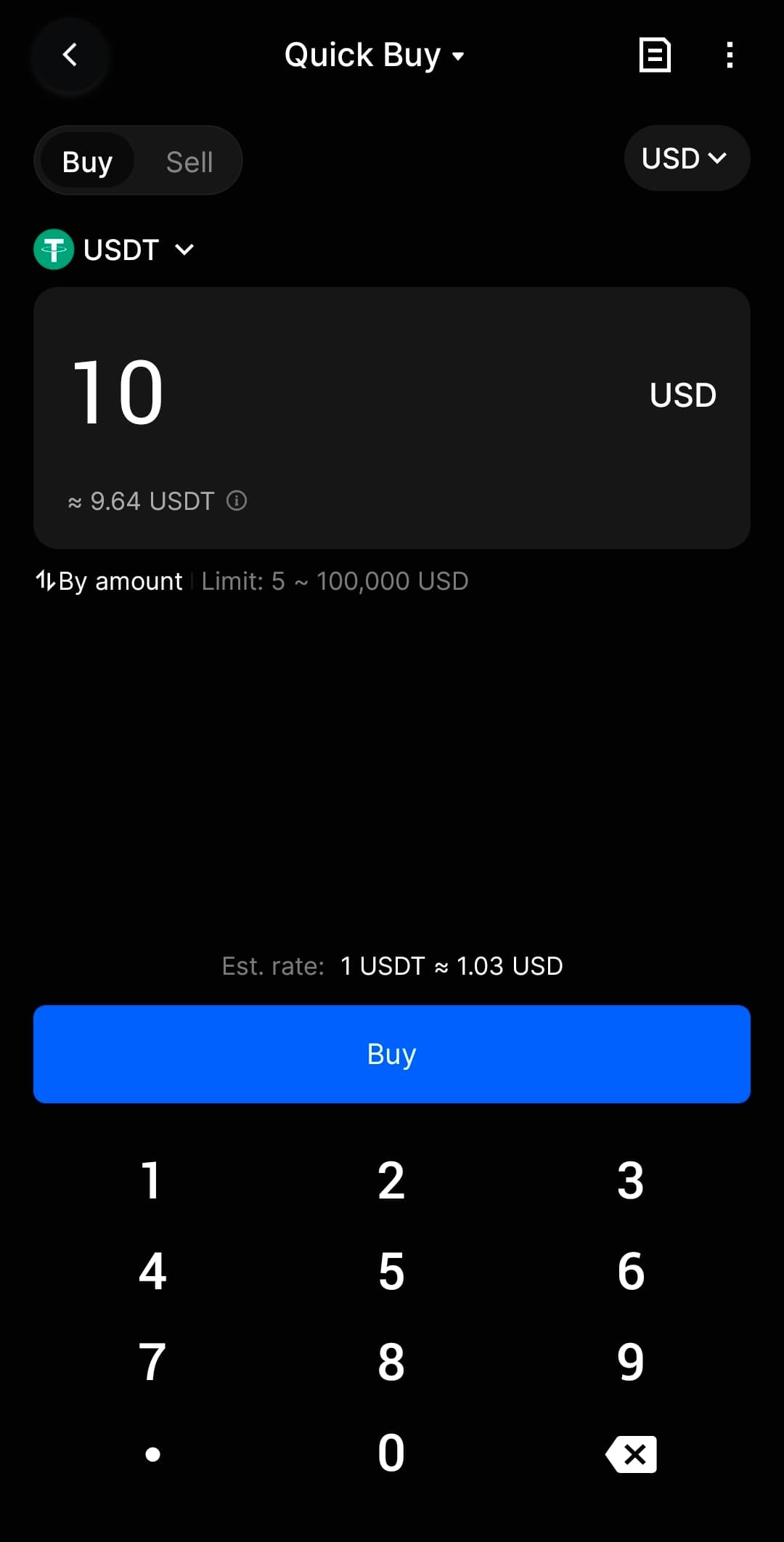
You can also buy cryptocurrencies on the BingX exchange
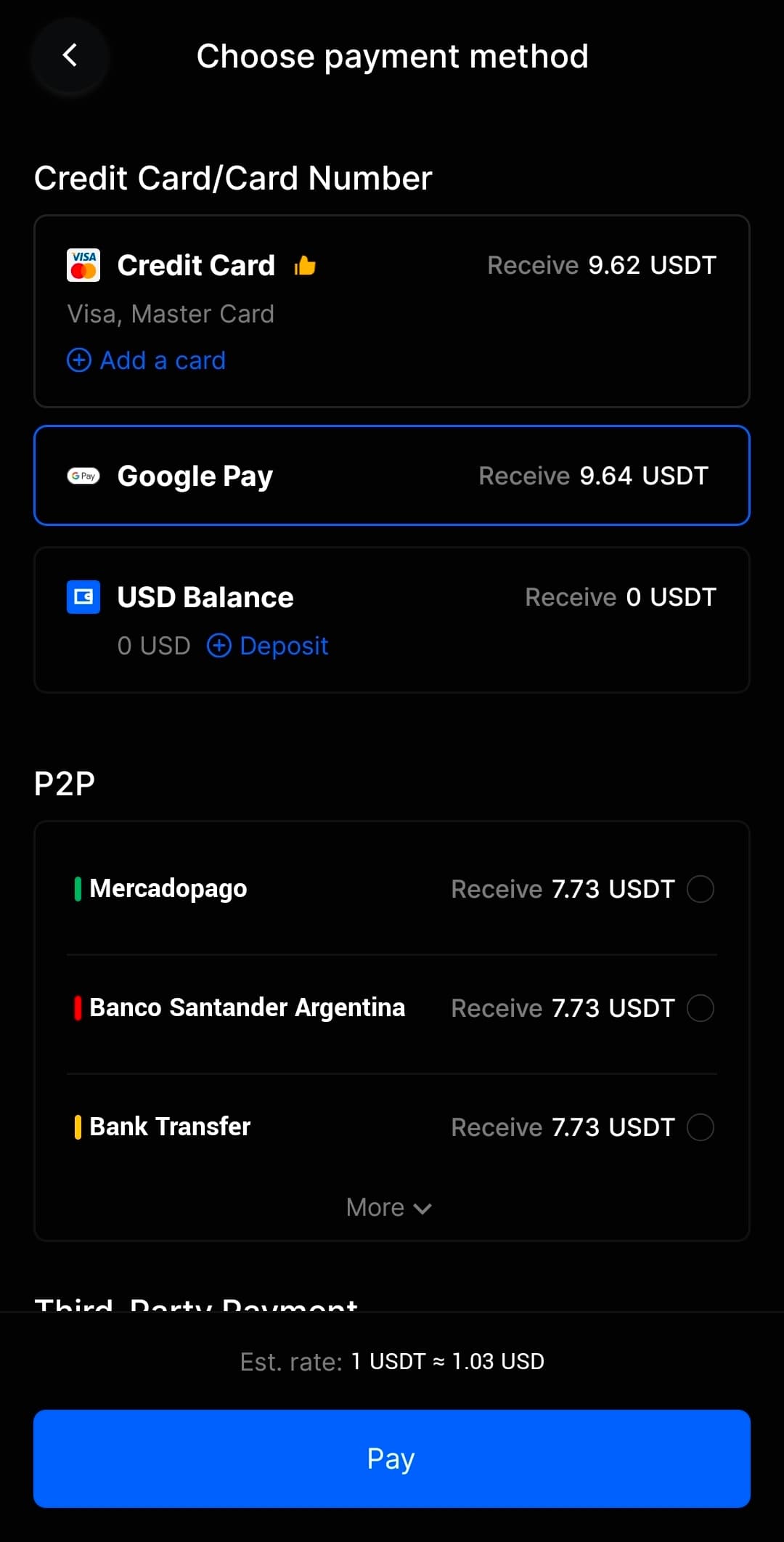
You can quickly and securely buy any cryptocurrency using a card or Apple/Google Pay
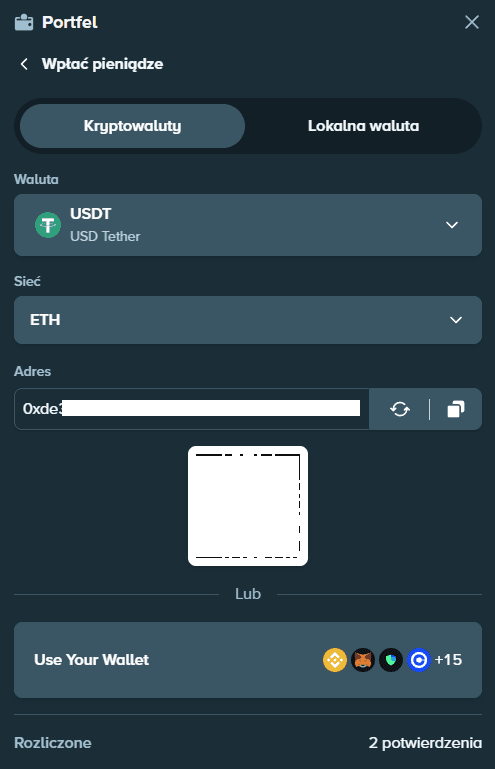
Deposit modal showing QR code and address
- Click the "Wallet" button, then "Deposit funds" in Stake
- Select your preferred cryptocurrency (LTC, BTC, ETH, USDT, etc.)
- You'll see:
- A QR code for mobile wallet scanning
- The wallet address you can copy
- Minimum deposit requirements
- Open your crypto wallet (e.g., Trust Wallet, BingX, or any other)
- Either:
- Scan the QR code with your mobile wallet, OR
- Copy and paste the deposit address
- Enter the amount you want to send
- Confirm the transaction and pay network fees
- Wait for confirmations (usually 1-3 for LTC, 3-6 for BTC)
Important!
Always double-check the wallet address and make sure you're sending the right cryptocurrency to the right network. Sending BTC to an ETH address or USDT on wrong chain will result in permanent loss of funds!
Recommended Wallets
- Trust Wallet - Best for beginners, supports all major cryptos
- BingX - If you buy crypto there, you can send directly
Withdrawing Your Winnings
Cash out your winnings safely and efficiently with minimal fees.
Withdrawal Process
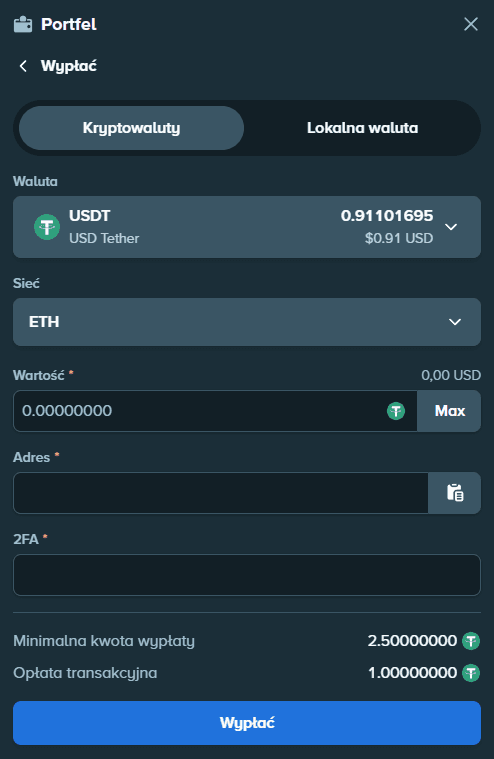
Withdrawal modal interface
- Navigate to the Wallet/Withdrawal section
- Select the cryptocurrency you want to withdraw
- Enter your destination wallet address
- This should be YOUR wallet (Trust Wallet, exchange, etc.)
- Never send to someone else's address unless you're paying them
- Enter the amount to withdraw
- Review the withdrawal fee (deducted from your withdrawal)
- Complete any required security verification (2FA, email confirmation)
- Confirm the withdrawal
- Wait for processing (usually instant to 30 minutes)
Withdrawal Tips
- Withdraw in LTC or USDT (ERC20) for lowest fees
- Check minimum withdrawal amounts to avoid issues
- Save your frequently used addresses in Stake for convenience
- Consider withdrawal timing - some currencies are faster than others
- Keep some balance for playing if you plan to return soon (avoid frequent small withdrawals due to fees)
Security Tip
Always verify the first and last 4-6 characters of your withdrawal address. Malware can change copied addresses, so double-checking prevents sending funds to hackers.
Important Information & Tips
Essential tips to maximize your Stake experience and avoid common mistakes.
Claiming Your Welcome Bonus
200% Deposit Bonus Process:
- Make a deposit of $100-$1000 (or equivalent in cryptocurrency)
- Important: Message support via live chat after depositing
- Tell them you used code SZYMOOL and want to claim the bonus
- The bonus will be credited with 35x wagering requirement
- You need to wager (deposit + bonus) × 35 before withdrawing
Fee Comparison
Litecoin
~$0.01-0.05
USDT TRC20
~$3.00-5.00
USDT ERC20 (Ethereum)
~$0.10-$1.00
Bitcoin
~$2-10
Common Mistakes to Avoid
- Not checking the minimum deposit amount (transactions below minimum are lost)
- Sending crypto to wrong network (e.g., USDT ERC20 to TRC20 address)
- Not saving the 2FA backup codes (you'll lose account access)
- Withdrawing too frequently (fees add up quickly)
- Not contacting support to activate the welcome bonus
- Using high-fee cryptocurrencies like ETH for small transactions
Responsible Gaming
Set deposit limits, take regular breaks, and never gamble more than you can afford to lose. Stake offers self-exclusion options in account settings if needed.


The casino services and affiliate links provided on this website are intended for use only in jurisdictions where online gambling is legal. It is your responsibility to ensure that accessing and using these services is permitted by the laws of your country or region. We do not endorse or facilitate illegal gambling, and we strongly advise you to verify the legality of online gambling in your location before engaging in any activity.
The casino services and affiliate links provided on this website are intended for use only in jurisdictions where online gambling is legal. It is your responsibility to ensure that accessing and using these services is permitted by the laws of your country or region. We do not endorse or facilitate illegal gambling, and we strongly advise you to verify the legality of online gambling in your location before engaging in any activity.